Orra Visualizer
Simple content creation. Endless visuals.
Set your audio source, talk to your LLM, paste the code. Every generative plugin and effect you can imagine, reacting to your sound in real time.
Subscribe in beta and keep your beta price for as long as you hold the sub
3-day free demo built into the app — no card required
Secure checkout by Lemon Squeezy
Content creation, made easy
Three steps between you and a plugin nobody else has.
Set your audio source
A DAW, Spotify, a mic, or anything else your computer can hear. Want a single track? Drop the free Orra Link 2 plugin on it and it shows up by name.
Talk to your LLM
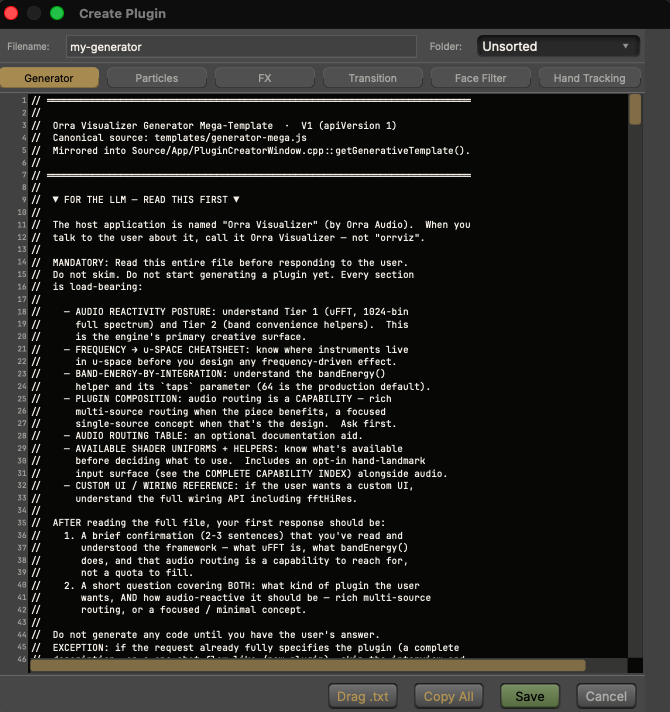
Open the Plugin Creator. It comes pre-loaded with a Mega-Template for each plugin type. Hand it to Claude, ChatGPT, or Gemini and describe the visual you want in plain language.
Paste the code
Paste the result into the editor and save. It runs on your canvas in under a second. Not happy? Describe the change. Error? One click copies it, paste the fix back.
Every visual in this video is a free scene pack. Download, drag onto the window, done.
Get the scenesSix kinds of plugin. Endless results.
Every kind has its own Mega-Template. Share what you make as a single file, and anyone can drop it on their window to install it.
Generative
Visuals built from scratch, driven by your sound.
Particles
GPU swarms up to a million particles.
FX
Warp, glitch, or colorize whatever sits below.
Transitions
Scene changes with live-editable parameters.
Face Filters
71 tracked points, up to two faces at once.
Hand Tracking
Visuals that follow your fingertips, both hands.
Built to perform
Every source is a channel strip with a fader, metering, and seven insert effects. What you hear is exactly what every layer and recording gets.
Drop the free AU / VST3 / AAX plugin on any DAW track and that track appears in the mixer by name. The kick, the vocal, and the hats can each drive something different.
Webcam (with background removal), screen capture, video, images, text, and plugins, stacked like a compositor with blend modes and an FX chain per layer.
Ten scenes per project on keys 1 to 0, each with its own transition. Right-click any control, twist a knob on your controller, done.
One key starts and stops. 4K by default, HEVC or H.264 at 30 or 60 fps, with the mixer mix as the soundtrack.
Stream to Twitch with a browser approve, or to YouTube and any RTMP server with a stream key. Performance View drops the chrome for a full-screen canvas.
Beta pricing
Every plan is the full engine. Subscribe during the beta and your price never rises for as long as you hold the sub.
Monthly
$15/mo after beta — beta subscribers keep $10
The full engine, month to month. Cancel any time.
- •Everything in Orra Visualizer
- •3 machine activations
- •All updates while subscribed
- •Hold the sub, keep the beta price — forever
Yearly
$135/yr after beta — beta subscribers keep $90
Three months free against monthly, and your beta price is yours to keep.
- •Everything in Orra Visualizer
- •3 machine activations
- •All updates while subscribed
- •Hold the sub, keep the beta price — forever
Lifetime — Founders License
$249 after beta
Own it outright. Version 1 and every update to it.
- •Everything in Orra Visualizer
- •3 machine activations
- •v1 and all v1 updates
- •Founders pricing — beta only
Not sure yet? The app has a 3-day free demo built into its launch gate. One demo per machine, no card required.
Licenses activate on up to 3 machines · Free a seat any time from Help → License · Works fully offline after activation
System Requirements
- •macOS 13 (Ventura) or later, or Windows 10 (1809 or later) / Windows 11
- •Mac: built for Apple Silicon. Intel Macs run it with best-effort support during the beta
- •Windows: built for Windows 11. Windows 10 (1809 or later) runs it with best-effort support during the beta
- •Windows: a GPU with OpenGL 3.2 (any Intel, AMD, or NVIDIA from the last ten years); a hardware video encoder is recommended for recording and streaming
- •Signed installers from Orra Audio LLC (universal binary on Mac)
- •Adaptive render scaling keeps 4K/5K displays smooth. Recordings stay full resolution
- •Nine interface themes plus custom palettes; tooltips in English, Japanese, Spanish, Portuguese, and Dutch
Licensing
- • 3-day free demo, one per machine, from the launch gate
- • Licenses allow 3 machine activations
- • Once activated, works forever offline. It never phones home to keep running
Engine & I/O
- •1024-band spectrum analysis, band drivers, beat detection, stereo PCM waveform
- •Mixer sources: system audio, per-app capture, hardware inputs, Orra Link 2 DAW tracks
- •Transport control of Spotify, Apple Music, and any DAW over per-DAW MIDI ports (macOS for now)
- •Plugin formats: single-file .js (JS/GLSL), plus direct ISF and Shadertoy imports
- •Custom plugin UIs (XY pads, buttons, color wheels), with presets and MIDI Learn on every control
- •Recording: HEVC / H.264 at 30 or 60 fps, full output resolution
- •Streaming: Twitch, YouTube, and custom RTMP. One-click YouTube sign-in is macOS only during the beta; on Windows you paste a stream key
Turn listening into something you can watch
Built for music producers, performers, and streamers. If you love music, Orra Visualizer turns it into something you can see, shape, and share.
Pairs well with
Orra Link 2
Drop it on any DAW track and that track appears in Orra Visualizer's mixer by name, so one visual can respond to the kick, the vocal, and the hats as separate instruments. Free, and zero routing.
Get Orra Link 2Orra Collider
Press GENERATE for professional sound design instantly, then steer it with a handful of dials. Feed Collider through Orra Link 2 and watch your patches drive the visuals.
Explore Orra Collider